Showing posts with label Iphone. Show all posts

September 26, 2009

GPush for iPhone versus Google's Gmail push

GPush on iPhone

GPush on iPhone now has a Gmail in-box within the app.

(Credit: Screenshot by Jessica Dolcourt/CNET)

In mid-August, the GPush app came into iPhone's App Store, promising to send push notifications of Gmail messages when new mail came in. Just last week, Google offered its own push solution for Gmail messages, one that pushes e-mail down from the server into the native iPhone in-box. Did that spell the end of GPush? Not quite.

First, Google's push service, which is handled by Google Sync, can vibrate the phone and sound an alert chime when it pushes a new message down from the server, but it lacks GPush's alert bubble that helpfully displays the sender and subject.

Second, GPush and Google are neck and neck when it comes to performance, at least as far as our iPhone is concerned. GPush sniffs out the new message faster about half the time, perhaps even more often. The bottom line: Google's push isn't necessarily faster or better.

Although Google's official push option is free and GPush is a premium app (whose price ratcheted up from 99 cents to $1.99), you still pay a price going Google's route. You're allowed to have one e-mail account sync over Microsoft Exchange. If you use Google Sync, you've used your shot. This is poor news for those who also access their work mail from their iPhone over Exchange. For this set, GPush is the better way to go. You can still use a standard Gmail account that pulls e-mail from the server at regular intervals, and use GPush to let you know when a new message trickles in, who sent it, and what it's about.

GPush notification on iPhone(Credit: Screenshot by Jessica Dolcourt/CNET)

An update to GPush adds a Gmail in-box to the application interface and a "View" button to the notification alert. Press that button and GPush can now open your in-box within its application. Since GPush is giving you access to Google's mobile Gmail site for iPhones, you'll be able to do anything with that e-mail that you could do from the Safari browser. In other words, with its proactive notification alert, Gpush has just one-upped Google, using Google's mobile site.

While the new Gmail in-box feature is exactly what we asked for, having Gpush open to the Gmail in-box tab took longer than it should. We hope to see this speed up in a future release.

What do you think about the GPush app versus Google's official Gmail push? Share your thoughts in the comments.

Trapster app steers you clear of speed traps

Trapster alerts you to nearby speed cameras and "Smokey takin' pictures."

It's been nearly a year since the debut of Trapster, a controversial but popular app that alerts you of nearby speed traps, cameras, and the like.

Version 3.5 just hit the App Store, bringing with it some impressive--and, for many users, long-awaited--new features. Here's the rundown:

  • Improved interface Five features (some of them new) are now accessible by tapping blue icons that span the right side of the screen.
  • Bluetooth audio If your car supports Bluetooth, you can pair Trapster to your stereo to get audio alerts over your speakers. Even better, if your car supports A2DP (i.e. stereo Bluetooth), you can take advantage of:
  • Built-in iPod controls Tap the little musical-note icon to slide open Trapster's iPod audio controls. Obviously, you don't need stereo Bluetooth to use them, but it sure is a nice combo.
  • Rotating maps Trapster tacks your position in real-time on a moving map. Now, that map can rotate depending on your direction of travel rather than staying in "always-North" mode. The top blue icon toggles this feature on and off.
  • Real-time traffic The bottom blue icon slides out a Google Traffic map, which shows you trouble spots in your area. Handy, but it's too bad the developers couldn't integrate this with the main map instead of requiring you to view a second one.

As before, Trapster lets you report your own speed traps, cameras, and checkpoints with just a few taps, but in version 3.5 these "trap" buttons are larger and easier to read--while driving.

And that brings us to Trapster's controversial nature. It's not only dangerous to fiddle with an app like this while driving, but it effectively encourages drivers to break speed-limit laws--thereby endangering others.

It's just my two cents, but those laws are there for a reason, and if you get caught breaking them, you should take your medicine. (Before you shout me down in the comments, remember: This is a blog post, not a news story. I'm allowed to express an opinion. :)

Of course, one could argue that knowledge of speed-trap locations might actually lead to slower, safer driving. Hmmm.

As a fellow resident of the road, all I ask is that you drive sensibly and wait till you hit a red light before interacting with the app. I'll return the favor.

OK, end of sermon. Trapster is a well-designed app with an impressive range of features, including some nifty trip-planning stuff and optional push notifications of new traps. Most amazing of all, it's still free.

O2 denies delaying 0870 app for the iPhone - so was it Apple?


Did Apple hold up the appearance of the 0870 application for the iPhone in the iTunes App Store because of lobbying by O2 and BT - which wanted to protect the lucrative income they could get from the higher-rate calls rather than landline calls?

That's the accusation being made at the Telegraph's blog.

O2 has denied that it blocked it: a spokesperson told Guardian Technology "We have no problem with the app at all... We didn't hold it up."

At issue is the 0870 application written by Simon Maddox, which has been available on Google's Android platform for, oh, about a year. But it had been sitting in Apple's App Store approvals queue for, oh, about the same length of time. Why? No answers. Apple doesn't do "answers" to explain delays; it barely does them for its rejections of apps.

But the 0870 app has finally appeared on the iTunes App Store. (Here's the download link - opens in iTunes.) And it's popular (going by the ratings for the app), of course, since it saves people money.

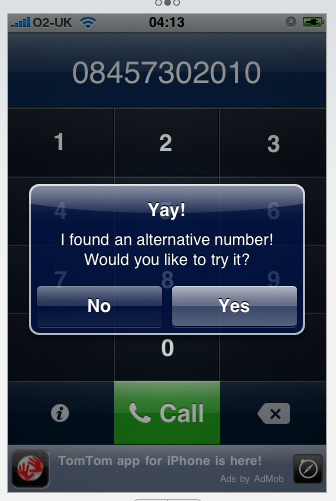
The app, which finds standard landline (non-087x//084x) numbers as alternatives to the pricier ones (which won't be included in the O2 package if you're on an iPhone, meaning calls to those numbers won't be part of your inclusive minutes), wasn't rejected. It just wasn't approved. This may remind you of Google Voice, which Apple has said it didn't reject. It's just "considering" it. The effect, of course, is the same.

O2 is (in effect) blaming Apple for the holdup. In a statement to Guardian Technology, the company said: "We can confirm that O2 was first contacted about the iPhone 0870 app in September this year. We asked for more information on what it would do and confirmed within two days of the initial contact that we would not have a problem with the app."

The accusation is that O2 - and/or BT - didn't like the idea of people actually (gasp!) saving money. Even though they could, of course, have gone on to the saynoto0870.org site on their iPhone and found the landline number (using O2's data service, which they get free) and then made the call - which would actually work out more expensive to O2, because it would mean a data lookup as well as the call. (But of course not everyone would use the website if they didn't have the app - just as there will still be people who, even though the app is free, won't realise it's there. Do tell them, won't you?)

O2's claims do however fit in with Maddox's experience. Two days ago, Maddox was at a low ebb: "Well, it's official. 0870 will NEVER be on the iPhone App Store. Will be releasing it for Cydia soon." He added that he had an (unofficial) Apple response from a source inside the company who said: "I've finally gotten word from O2 that neither they, nor anyone at BT, would be happy about this service."

Yet two hours later he was told that O2 had approved the app - which just left it up to Apple. And very soon, the app was in store.

So the question now is: did Apple lose it down the back of the sofa? Did it think that it would protect its telco partner in the UK by delaying the app? The case isn't quite closed. But iPhone users, just like Android users, can at least avoid one of the big money-spinners for the telecoms industry of recent years.


iPhone MMS is now live !

All you've gotta do is plug that iPhone 3G or 3GS into iTunes, run the teensiest of updates, restart the phone, and you can at last make that fashionably late entrance into the 21st century you've always dreamed of. That's right folks, MMS on the iPhone is live on AT&T at last.

AT&T Offering Cheap Refurbished iPhone 3G Units

AT&T is apparently selling refurbished iPhone 3G units on the cheap according to the company's Facebook page. The current ad is now offering the 8GB unit for $49 while the 16GB is retailing for $99.

September 25, 2009

It’s Official! MMS Coming to the iPhone This Friday

It was announced a few weeks back but it was confirmed again today on AT&T's Facebook page. MMS for iPhone will be available this Friday.

We know you've been eager for this service so we wanted to offer a quick update on the launch plans for MMS on Friday, Sept. 25. Late morning, Pacific Time, on Friday, the new carrier settings update enabling MMS should be live and ready …to download through iTunes.

This will come in the form of a carrier update that you will have to download via iTunes. Yay!


MyProfiles Lets You Create Different Profiles for Your iPhone


I remember my good old Nokia 8210. It was about 10 years ago and this nice little piece of technology would already let me create different profiles to fit different situations of the day. For example, I had a "night" profile where everything was silent with no vibration; I had a "work" profile where everything was silent with vibrations; I had a "normal" profile where everything would ring and vibrate, etc…

Fast-forward 10 years and about 10 other cellphones later, and here I am, with a $560 iPhone not capable of creating different profiles. It's not a big surprise. Apple is deliberately handicapping the iPhone and releasing must-have features (hint: copy/paste) one at a time.

Fortunately for iPhone users, there is the jailbreak community which really helps make the iPhone the best phone by developing all these important features that Apple won't let you have until year 2027.

MyProfiles is one of these great applications only available for jailbroken iPhones, and lets you create different profiles for your iPhone.

Find yourself constantly changing the settings on your iPhone depending on what you're doing or where you are? How about getting alerted when a critical email comes in from your boss? What about being able to sleep at night without being disturbed, unless it's a call from a loved one? Wish you didn't have to keep changing the auto-lock function when you're charging at your desk? Do all of this and more with MyProfiles!

Features:

  • Custom alerting of email based on Subject, Sender, Sent Only to You, and Mail Accounts.
  • Custom alerting of SMS messages and missed calls based on caller phone #.
  • Modify the Vibrate Pattern so you can be quietly alerted to a specific email.
  • Repeating Alerts for Email, SMS, and Missed Calls.
  • Silence Calls via WhiteList or BlackList
  • Escalating Rings and Vibrate 1st then Ring
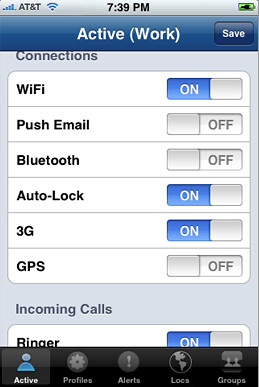
  • Adjust WiFi, Bluetooth, GPS, Push Email, Auto Lock, and 3G based on Location, Time of Day, and more.
  • Automatic rules engine to enable profiles
  • Manual Override Profile by holding down the home button and pressing up and down on the Volume buttons.

I haven't personally tried MyProfiles but I hear great things about it, even though it's still in beta. MyProfiles is available for jailbroken iPhones only via Rock Your Phone.


AT&T MMS Coming This Friday


iPhone MMS - AT&T Late Summer

Not that any of you AT&T customers really need the reminder. Regardless, the wait is almost over folks, AT&T is finally flipping the MMS switch for all of their iPhone customers this Friday, September 25th.

Sure, this day marked in your calendars but would any of you like to take bets on whether or not the network will buckle when you have every single iPhone owner sending picture after picture all day long? Don't be too upset when the person you are sending the image to tells you they have not gotten it yet. That's more than likely to happen unless AT&T really used this extra time wisely and indeed beef up their network for the flood gates they are about to open…

Still, according to some of our readers, it seems as if AT&T is currently sending out text messages reminding you of this day that so many of you cherish.

"Picture &video message(MMS) will be available for iphone on 9/25. While we prepare your account for MMS capability, the current " view my message" experience will be turned off but your ability to send and receive text messages will not be affected."

How many of you have received this message?


iTunes 9.0.1 Fix the Out-of-Order Episodes Bug for You?


Podcast order bug fixed

With the release of the iTunes 9.0.1 update last night, we downloaded it and proceeded to run some tests, and lo and behold, it seems that annoying out-of-order podcast bug is gone for us.

You remember the one, where you'd sync a number of episodes and instead of being sorted numerically, up or down, (i.e. 1, 2, 3, 4) they were randomly assigned (i.e. 1, 4, 2, 3).

If you've installed iTunes 9.0.1, and tested out the sync sequencing, let us know if you're back in order as well.


Could We See an iPhone on Verizon by the Holidays?


iphone_balrog_verizon

Could we see a combination CDMA/HSPA iPhone hit Verizon before the holidays? No, we don't think so either, but that's the rumor we're hearing again.

Of course, we're no stranger to iPhone on Verizon rumors, whether they be wishful thinking or the result of ongoing, longterm Apple/carrier negotiations that may or may not ever amount to anything, it's ironic that rumors about America's most reliable network are almost always anything but…

Given the limited remaining lifespan on CDMA (Verizon's going LTE for 4G) and market (primarily the US — even Bell and Telus in Canada are going HSPA), it just seems like such an un-Apple-like thing to do. Then again, Verizon's customer base is no doubt a huge temptation for Apple. Given how many iPhones they sell on AT&T, if they hit Verizon, we can only imagine the market share shift. (Not to mention the load balancing of network traffic that would hopefully follow).

Again, we're not getting our hopes up. We don't think we'll see an iPhone on Verizon any time soon, especially not before the holidays. Let's face it, it's almost October already and the window to effectively launch and market the iPhone on a new US network by then is rapidly diminishing from slim to none.


September 24, 2009

How to Transfer iPod Songs to iPhone

Apples iPod devices have become an integral part of many people lives and these days almost everyone seems to own at least a regular type iPod. However for those of you who are dedicated apple users and have purchased their latest tool, the iPhone, are probably wondering how the heck you are supposed to transfer your music and videos off your iPod onto your new iPhone. It seems like an impossible task and since apple hasn't provided you with any regular utilities to get the job done, many people simply think it cannot be done. Well I've got news for you, it can be done, and you can pull it off quite easily within a few minutes if you have the right tools. So in this article I am going to show you "How to Transfer iPod songs to iPhone" very easily and quickly all with the aid of simple software.

There may be many reasons as to why you wish to transfer music from your iPod to the iPhone. You may have just bought a new iPhone and wish to put some songs on there without having to re download them or buy them again from the iTunes store. Perhaps you heard a song or watched a video on a friend's iPod that you really enjoyed and would like to transfer it to your own iPhone/iPod. Whatever the reason maybe that you need to transfer songs from iPod to iPhone you can get it done with an iPod to iPhone transfer Program. These programs are specifically designed to help you transfer music between different iPod devices and iPhones and they will get the job done quickly and efficiently all at the click of a few buttons.

You see apple does not allow the transfer of files between different iPod devices due to extreme copyright laws and also because they wish to make extra money from their iTunes store. So for this reason they have not provided you with any options in iTunes or given you any other utilities to help you transfer files from iPod to iPhone. But as you already know "where there is a will there is way", this is where third party programs have come to our rescue, and provided us with great programs that will allow you to transfer whatever you like between different iPod devices.

So if you wish to transfer iPod songs to iPhone or any other type of file (Videos, Pictures etc.) for that matter, then you need to obtain a good iPod to iPhone Transfer Program. The only decent program that I know of is iPod 2 iPhone, it's excellent software that will get the job done properly and the best part is that you can download it for Free as they offer a trail version to test it out.


Followers

The Smart Phones Copyright © 2009 Premium Blogger Dashboard Designed by SAER